Data classification in Jamk
Jamk has implemented a unified model for data classification across the entire organisation. This feature will cover all files and emails processed via M365, as well as all files on network drives. Initially, classification is available only for staff, but as competence and experience increase, students will also be included.
Why classification is neccessary?
The aim of data classification is to ensure that information processed within the organisation is better protected, easier to locate, and can be shared securely. Classification enables the organisation to meet legislative requirements as well as various collaboration obligations within the higher education network. The Rectors’ Council of Finnish Higher Education Institutions has set a requirement that all Finnish higher education institutions must implement as unified a classification model as possible by the end of 2026. In essence, this acts as a “common traffic rule”, indicating what kind of information a document contains and how that information may be handled. Classification enhances information security, data protection and increases trust among customers and partners.
How do I use data classification?
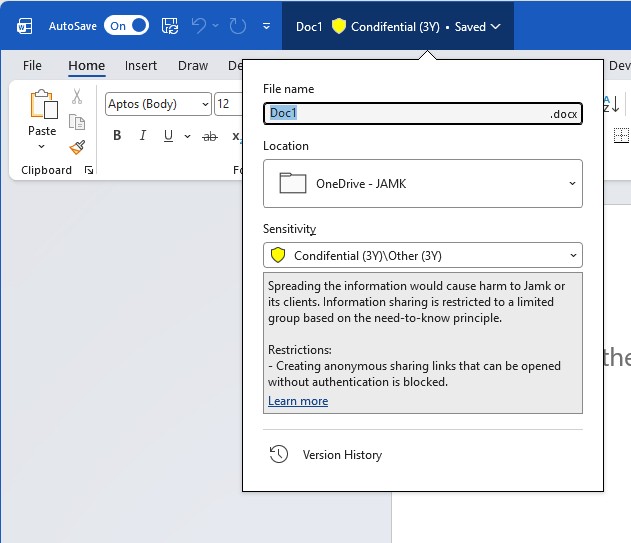
Applications used in Jamk’s M365 services will offer six classification levels to choose from, with each containing two to three sub-levels. Everyone selects the appropriate level for their file based on its content. The selection is not final and can be changed if the content or intended use changes. Sensitivity label tool includes briefly description about selected label to help user to choose label.
- Private – Information is not related to work tasks at Jamk
- Open (5W) – Information can be shared freely outside Jamk
- Internal (4G) – Information is allowed to be available to Jamk staff and/or students
- Confidential (3Y) – Spreading the information would cause harm to Jamk or its clients. Information sharing is restricted to a limited group based on need-to-know principle.
- Strictly confidential (2A) – The information requires special protection measures and information is restricted to a limited group
- Secret (1R) – Spreading the information would cause serious harm to Jamk or its clients. The information requires special protection measures.
The selected classification is visible at the top of the document and email. In some cases, classification information is also added to the file’s header. The chosen classification automatically controls other technical protection measures in the background, such as access management, encryption level and sharing restrictions. For example, the system may automatically encrypt the entire email thread if the classification of an attached document requires it or alternatively prevent forwarding the email or taking screenshots. Therefore, always select the appropriate level for the document based on its content and sensitivity. Also check the instructions before saving the file to ensure that the chosen storage location is suitable for the selected classification.
More detailed guidance can be found in Jamk’s internal instructions on Elmo-Intra. The guidance includes more detailed descriptions of the restrictions in use as well as support tools and examples to help you choose the correct classification data label.