Valo Graduation Service
The Valo graduation service is intended for students and staff. It brings together the graduation process task list and instructions in one place. It provides a shared workspace for the student and the processors, supporting the smooth preparation of the certificate application and improving transparency in the graduation process.
The graduation service is part of the Jamk’s study administration system. You can find it in Peppi, on the student’s desktop homepage and in the top navigation under “Valo graduation service” and “Electronic Services.” The Valo graduation service can also be used on mobile devices.
The service operates in the same language you use in Peppi. You can change the language setting in Peppi.
Recommended browsers include Chrome, Safari, Mozilla Firefox, or Edge – older Internet Explorer, for example, is not supported.
If the service does not function as instructed, try the following:
- Log out of the system and close the browser
- Log back into the Valo graduation service via Peppi
- Try using a different browser
If these steps do not resolve the issue, submit a service request to Student Services via the Helpdesk.
Graduation
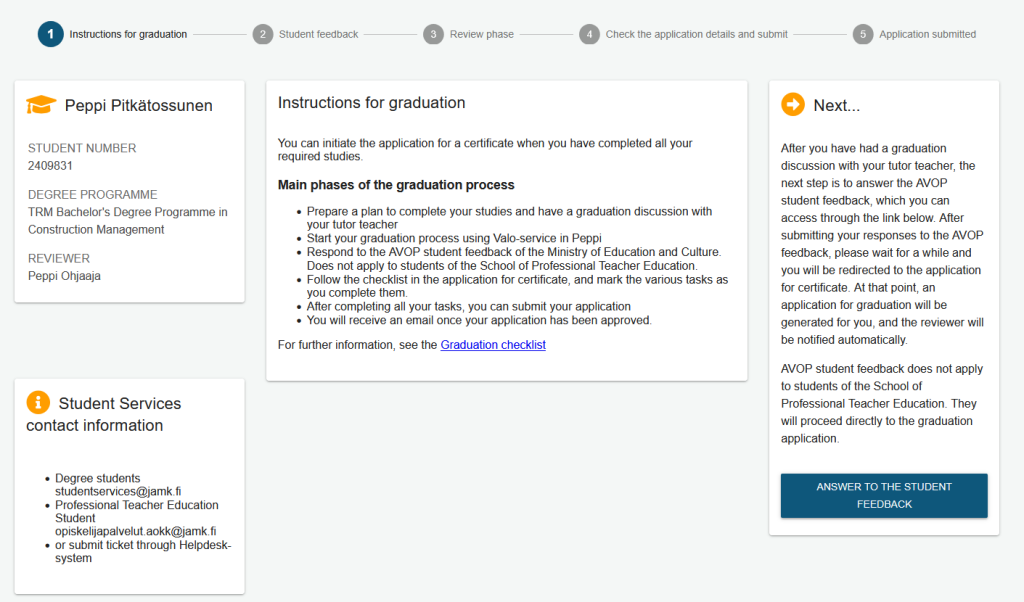
You can start the graduation process once all your required studies have been completed and you have had a graduation discussion as part of your studies. On Valo’s homepage, you will see an overview of the main stages of the graduation process. More detailed instructions are available on the Graduation checklist.
If you notice that the name of your reviewer is missing, contact Student Services. The reviewer’s name must be entered in Peppi so that your application is directed to the right person.
The system guides you step by step on what to do next and indicates which tasks are the responsibility of the application processors. The most important steps for the student are the graduate feedback survey (AVOP) and the certificate application task list.
Please note:
- If you have multiple study rights, make sure you are logged into the one from which you intend to graduate. If the wrong study right is shown, return to Peppi and switch to the correct one.
- If you are not a degree student or a student at the School of Professional Teacher Education, you cannot create a certificate application.
Completing the Student Feedback Survey
Bachelor’s and Master’s students start the graduation process by completing the graduate feedback survey (AVOP). This does not apply to students at the School of Professional Teacher Education, who go directly to filling in the certificate application. You can access the survey from the graduation service homepage by selecting “Answer to the student feedback” The link will take you to an external page.
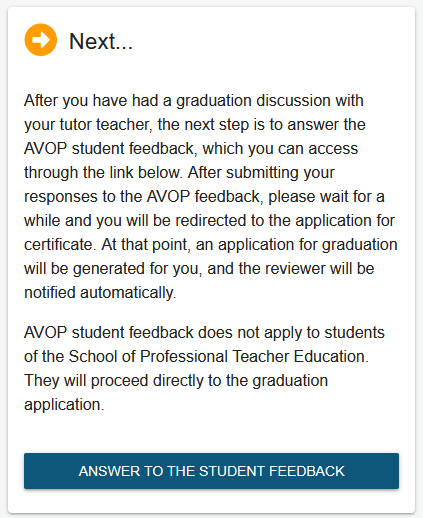
Log in to the AVOP survey page with your Jamk credentials and answer all questions in one session. If you leave the survey incomplete, your responses will not be saved and you will not be able to proceed in the graduation process.
After completing the survey, you will automatically return to Valo service. A certificate application will then be created for you, and your reviewer will be notified automatically. If necessary, log back into the graduation service in Peppi using your Jamk credentials.
If the AVOP survey does not open after HAKA login, make sure you have completed the required percentage of your degree credits (80% for bachelor’s level, 50% for master’s level).
For AVOP-related issues, contact Student Services.
Submitting the Certificate Application
Follow the certificate application task list and mark steps as completed.
Check in your PLP that the graduation discussion has been completed as part of:
- Bachelor’s students: “Development as an Expert” or “Career Planning and Working Life Skills” course (credits marked)
- Master’s students: included in final-stage studies
- Professional Teacher Education students: “Developing a Professional Teacher Identity” course (credits marked)
Check your contact details in Peppi and update them if necessary (see Peppi instructions).
By confirming the accuracy of your study register in Peppi, you accept all recorded information, such as courses, grades, and completion dates. After this, you can no longer request changes, for example to the grade of your thesis. Please ensure everything is correct before submitting your certificate application.
When selecting your graduation date, note that if you graduate before the 18th of the month, Kela may reclaim the study grant for that month. The date you choose will be recorded as your official graduation date on your certificate. The earliest possible graduation date is the day your application is received by Jamk. Ensure the selected date falls within the validity period of your study right.
After completing the graduation task list, submit your certificate application. If your application is incomplete, you will be contacted. Otherwise, the reviewer will forward your application for approval. You can track the processing through the change log.
Once approved, the graduation service will send you an email with confirmation and your graduation date.
Important Notes
- Your student user account will be locked 14 days after graduation. Save any necessary documents before this.
- Once your certificate is ready, you will receive a link in your personal email to download the electronically signed certificate. The link is valid for 30 days from when it is sent.
- You will receive a graduate career tracking survey five years after completing your degree.