Valo Graduation Service
The Valo graduation service is a tool intended for students and staff that compiles the graduation process task list and instructions into one place. It provides a shared workspace for the student and administrative staff, supporting the smooth preparation of the certificate application and ensuring process transparency. All parties can promote and monitor the fulfillment of graduation requirements in real time once the application has reached their stage of processing.
Application processors can have an overview of all submitted applications and their status. Applications can be sorted as needed. The reviewer sees applications immediately after the student initiates the process. The approver sees the application after the review has been completed. Substitute situations are easy to manage: an unfinished application can be reassigned to another handler, who will automatically receive an email notification.
General Information about the Valo Graduation Service
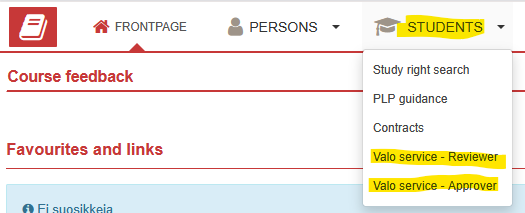
The Valo graduation service is integrated into Peppi. There are separate functions for Application reviewer and Application approver. These can be found on the Teacher’s Desktop in Peppi.
The service operates in the same language you use in Peppi, and the language can be changed within Peppi settings. Recommended browsers are Chrome, Safari, Mozilla Firefox and Edge. Note that Internet Explorer is not supported.
Front Page of the Valo Service
The service opens in a list view, displaying either your own or all applications. You can filter applications by selecting open or completed applications. The list can be sorted by clicking column headings (ascending/descending order).
Applications can be searched using criteria such as student name and student number.
The user can choose which fields are displayed. Displayed fields may include:
- Status
- Student
- Student number
- Degree programme
- Reviewer
- Approver
- Created at
- Reviewed
It is also possible to include form responses as columns in the list view.
Open an application by clicking the pencil icon.
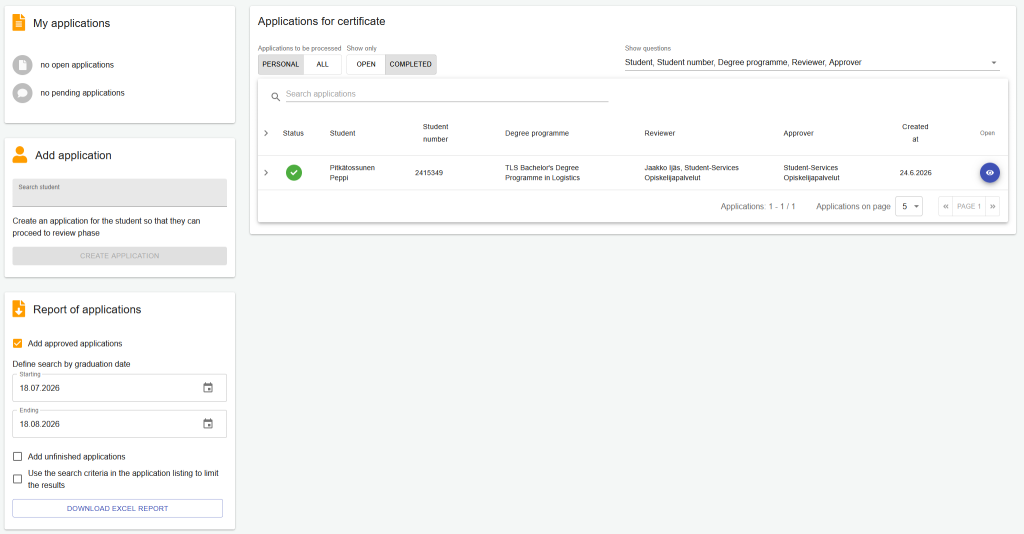
Applications assigned to you appear in the “My applications” panel on the left.
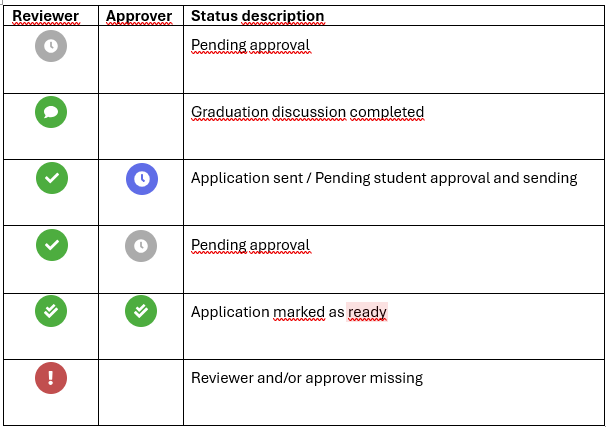
The system uses predefined statuses to indicate the stage of each application.
Adding or Changing a Reviewer
When a student initiates the graduation process, the reviewer is automatically assigned based on information in Peppi.
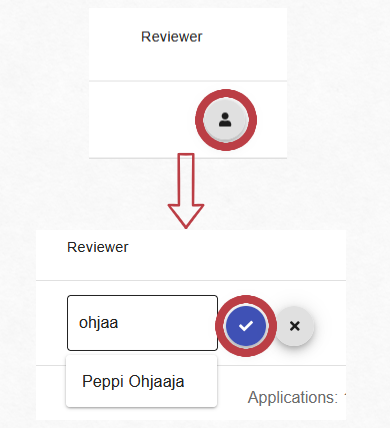
The reviewer can modify the handler if needed. Modifying is possible until the application has been marked as completed:
- Click “Change processor”
- Enter the new processor’s name (at least 3 characters)
- Select the person. The processor field cannot be left empty
- Confirm and save
The system automatically sends an email notification to the new processor.
Report of applications
All created applications can be exported to Excel from the front page.
You can choose to include:
- Graduated students within a specific date range
- All unfinished applications
- Both completed and unfinished applications
Follow Jamk’s data protection guidelines when handling personal data.
Troubleshooting
If the Valo service does not function as expected, try to:
- Log out and close your browser
- Log back in into Valo
- Try a different browser
- Clear browser cache and cookies
If the issue persists, submit a Helpdesk service request for Student Services.