Instructions for the Approver
The graduation service will send you an email when a student’s application arrives for processing from the Valo reviewer.
Go to review the application via the list on the home page.
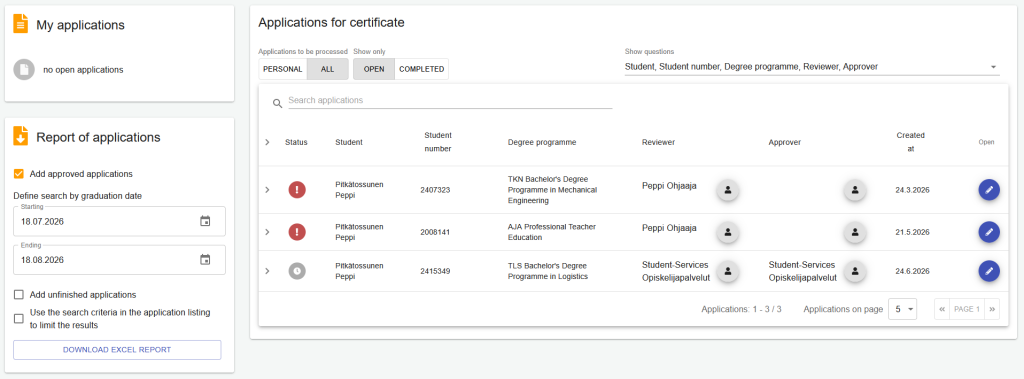
- Select your personal applications for processing.
- Open the application via the “Open application” option on the right side of the row.
Reviewing the Application
You will see both the student’s and the reviewer’s markings on the application, and you can check them there.
- Confirm that all studies required for the degree have been completed and recorded in the study register.
- Check from the student’s markings whether they have requested a specific graduation date and confirm the graduation date.
If there are deficiencies in the application, write them in the field “Additional information and notes” and return the application to the reviewer by clicking the “Return for review” button. The additional information will be visible to both the reviewer and the student. After clicking the button, a message window will open where you should enter the same information.
You can mark the certificate application as approved once you have checked and confirmed all.
Forwarding the Application to Student Services
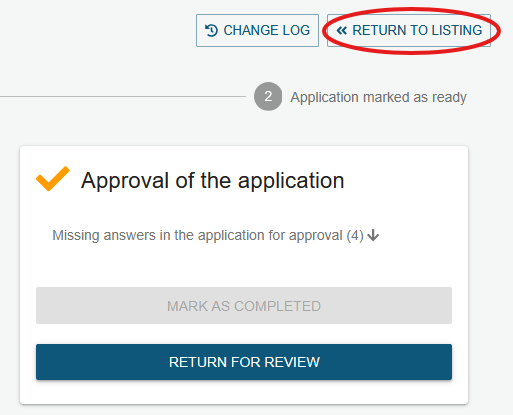
Next, return to the application list on the home page by clicking the “Return to listing” button in the upper-right corner.
Find the application you processed in the list.
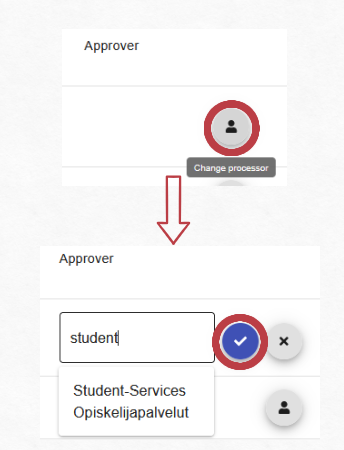
Add “Student Services” to the “Approver” field as the handler for the approval stage of the application. The search starts after at least three characters have been entered. Click “Save”. Student Services will automatically receive an email notification about the submitted application.
Student Services
Student Services review the entries made in the application and record the graduation date confirmed by the approver in Peppi. If necessary, Student Services can return the application to the approver or reviewer for further processing. When everything is in order and the student can graduate, Student Services prepare and send the electronically signed certificate to the student.